Without PIN Adsense PIN Verify Kaise Kare [Full Guide]
Without PIN Adsense PIN Verify Kaise Kare [Full Guide]

Hello,
Friends Adsense has the maximum problem in verifying Adsense Pin. It takes 3 to 4 weeks for an Adsense PIN to arrive by post. Anyone knows it and no one else has an AdSense PIN. There is a way for him to verify the AdSense PIN in a minute.
Friends Adsense has the maximum problem in verifying Adsense Pin. It takes 3 to 4 weeks for an Adsense PIN to arrive by post. Anyone knows it and no one else has an AdSense PIN. There is a way for him to verify the AdSense PIN in a minute.
Now-a-days, blogging has become popular in the village as well. So the person whose house is in the village may or may not have an AdSense PIN. , You can verify the PIN from Electrict Bil. So today we will talk about this Adsense Pin without Pin ke verify kaise kare.
So for this you follow steps with me.
So for this you follow steps with me.
Note: –First of all, prepare your Aadhaar card or pdf file of any other government id.
Step 1: –First login to Adsense.com.
Step 2: –After that in the homepage Sitting Icon Clicking on the left sidebar Account Information Click on it then here you Verify Address Click on
Step 3: –Now a page will open in front of you.
★ In it you are looking in the picture like below ”This Form” Click on.
★ In it you are looking in the picture like below ”This Form” Click on.

Step 4: –Now another page will open in front of you.
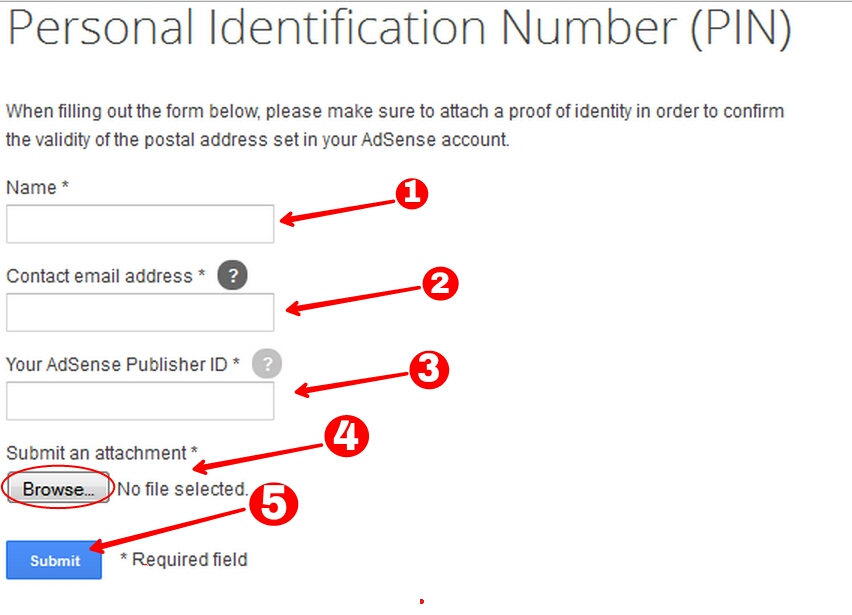
Image Options: –
1. Enter your full name.
2. Enter your Email Address.
3. Here is to insert Adsense Publisher Id.
4. Here, whether you have an Aadhaar card or an electricity bill, someone has to convert it into a PDF file and upload it.
5. Now at last you click on the Submit button.
1. Enter your full name.
2. Enter your Email Address.
3. Here is to insert Adsense Publisher Id.
4. Here, whether you have an Aadhaar card or an electricity bill, someone has to convert it into a PDF file and upload it.
5. Now at last you click on the Submit button.
Now you will send a mail on behalf of Adsense Team, it will contain all the information. You will get it in about 24 hours.


Comments
Post a Comment